How to change password of SuperIVR
- View as Markdown Open this page as plain Markdown (opens in a new tab)
- Open in ChatGPT Ask questions about this page (opens in a new tab)
- Open in Claude Ask questions about this page (opens in a new tab)
- Open in Google AI Studio Ask questions about this page (Google account required) (opens in a new tab)
Step 1 : Login to product URL – WebPanel Login
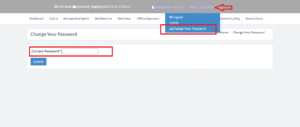
Step 2 : Click on Menu Drop-down (Rightside)
Step 3 : Click on “Change Your Password”
Step 4 : Mention your password in “Block” and “Submit”
Your password is Successfully changed..